
AI Relighting
Relight your photos and videos with neon, rim light and shadows, right in your browser.
Try AI Relighting ↗ MyPrompTribe
Your browser. Your creative studio.
Free image and video tools. No upload required for local editing.
Open Coqueta StudioRelight your photos and videos with neon, rim light and shadows, right in your browser.
Try AI Relighting Free · No account · Files stay on your deviceLayered photo and video editors with an AI assistant that edits for you: change the color, just the sky or the person, cut and animate. Everything stays in layers you can tweak.
Free · No account · Your files never leave your computer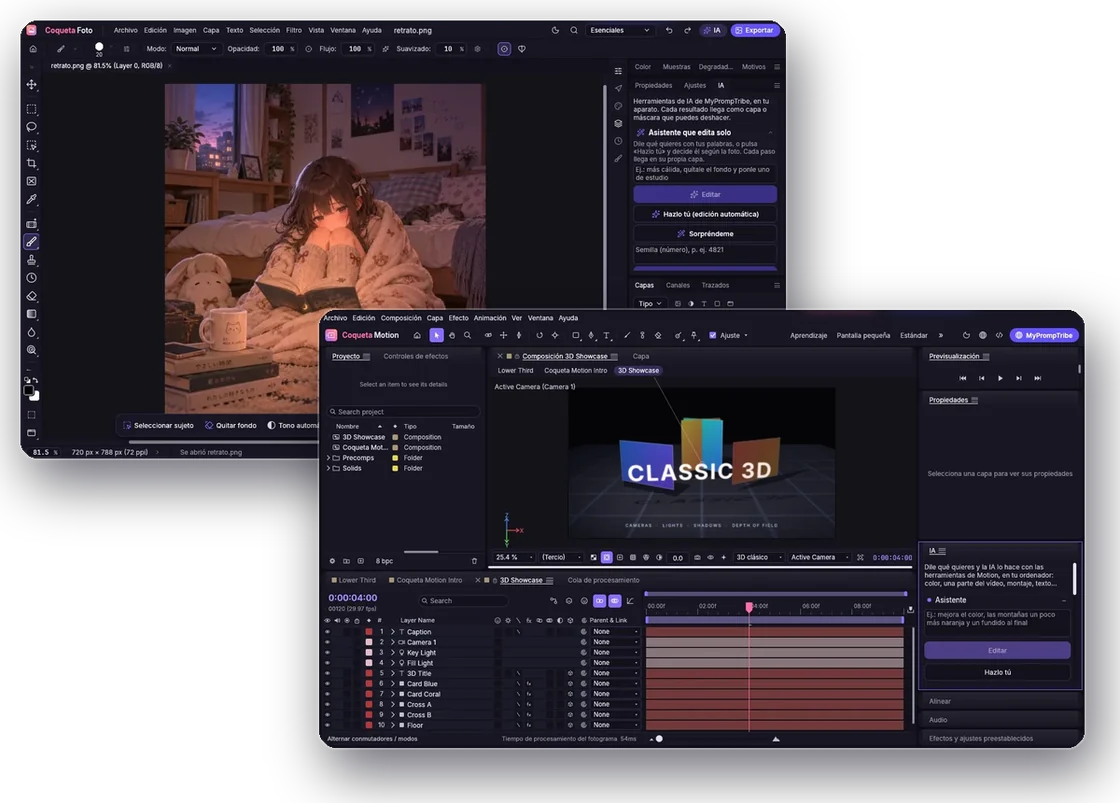

Your pet. Your circuits. Discover how AI learns.
Relight your photos and videos with neon, rim light and shadows, right in your browser.
Try AI Relighting ↗
Generate captions, correct the text and cut video by selecting phrases. Free, local processing.

Separate a subject with AI, add text and images, or animate your drawings. Review cutouts before exporting.

Enlarge small photos and improve definition. AI estimates missing detail; it cannot recover the exact original.

Improve short clips frame by frame in your browser. Processing speed depends on your device and video size.

Reduce file size, change dimensions and export in supported image formats. Preview the result before downloading.
Start local editing without signing in. Your source photos and videos stay in your browser. Publishing to the community is a separate action and requires an account; availability depends on the sharing feature.
Try short questions, prompting exercises and creative challenges in our separate learning section.
Each tool shows its supported formats and limits. Coqueta supports video export and animated GIF export for still-image or drawing projects. Keep a copy of your originals.

Free layered photo editor with AI
Explore what it does →
Online layered video editor and motion graphics
Explore what it does →
Combine images with AI and remove backgrounds
Explore what it does →